Logo
Games
Lantern
 Darktide GamesLantern Tracker 
 Warhammer 40k: Darktide 

 Darktide GamesLantern Tracker 
 Warhammer 40k: Darktide 

What the Darktide GamesLantern Tracker records

The Darktide GamesLantern Tracker is a mod that records every mission you play in Warhammer 40,000: Darktide. When the results screen shows, it writes a mission summary with your kills per enemy, damage dealt and taken, weakspot and critical hits, blocks, staggers, revives, pickups, objectives, ability usage, coherency, buff and talent uptime, and the weapons, blessings, perks and talents you brought.

Uploaded Darktide missions show up as a full mission report on Games Lantern, with a scoreboard for the whole strike team, so you can compare runs across classes, difficulties and circumstances.
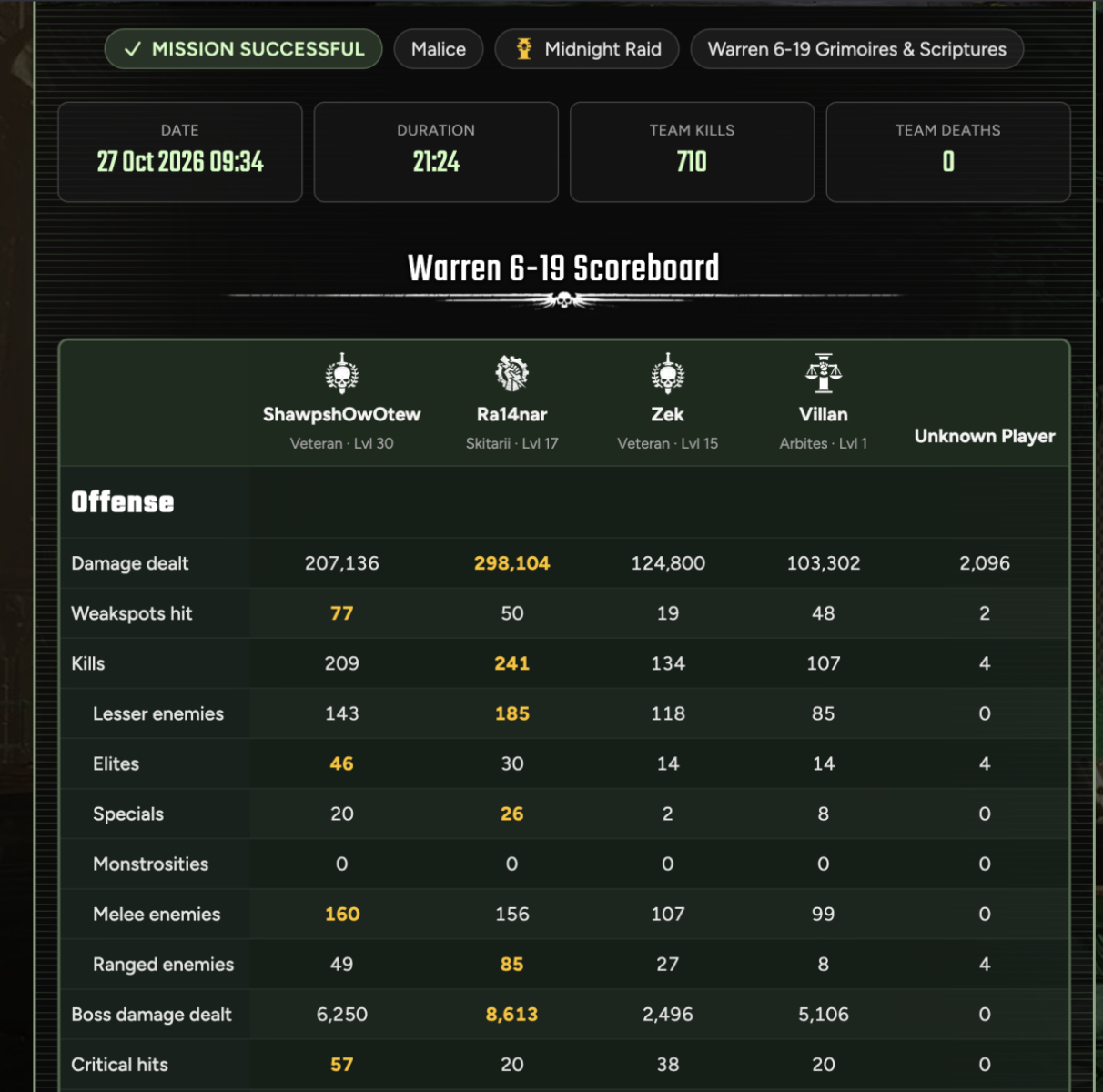
A small cutout of tracked stats from a mission uploaded to GamesLantern.

How to install the Darktide GamesLantern Tracker

  1. Install the Darktide Mod Framework (DMF).
  2. Download the Darktide GamesLantern Tracker and put the GamesLantern folder into the mods folder of your Darktide installation.
  3. Add GamesLantern to mod_load_order.txt, below dmf.
  4. Start Darktide and type /gl_status in the chat to check the Darktide GamesLantern Tracker is loaded.

Linking the Darktide GamesLantern Tracker to your Games Lantern account

Type /gl_link in the Darktide chat. Your browser opens on Games Lantern, where you log in and confirm the link within 15 minutes. Back in Darktide, type /gl_link_status to finish. From then on your uploaded Darktide missions belong to your account, and you can remove a linked Darktide GamesLantern Tracker at any time from your tracked missions.

Uploading your Darktide builds

With a linked account, /gl_build uploads the build of your current Darktide character as a private build on Games Lantern, with its talents, weapons, blessings, perks and curios already filled in. It works in the Mourningstar as well as in a mission, and the chat shows the link to the new build so you can edit, publish or share it.

Privacy and uploads

Nothing leaves your machine until you turn on auto upload in the mod options. You choose whether only won Darktide missions are uploaded or every mission. Only your own character is tracked in detail; for the rest of the strike team the Darktide GamesLantern Tracker records what Darktide shares with every player, such as damage, kills and pickups. The Mourningstar, the Psykhanium and the training grounds are never recorded.

Download the Darktide GamesLantern Tracker

Darktide GamesLantern Tracker Chat Commands

Darktide divider
Command Description
/gl_status
Shows the account link, the auto upload setting, the upload url and the current mission.
/gl_link
Starts linking the Darktide GamesLantern Tracker to your Games Lantern account in the browser.
/gl_link_status
Finishes a link confirmed in the browser and shows whether the account is linked.
/gl_unlink
Removes the account link.
/gl_build
Uploads your current build as a private build on your account.
/gl_upload_last
Uploads the last mission summary again while it waits for a retry.
/gl_export
Writes the summary of the current or last mission to Documents\GamesLantern.

Darktide GamesLantern Tracker Options

Darktide divider
Option Default Description
Auto upload Off Uploads the mission summary at the end of every mission.
Upload scope Successful only Uploads only won missions, or every mission.
Export on mission end On Writes the mission summary when the results screen is shown.
Keep copy Off Keeps the summary and the raw event log in Documents\GamesLantern.

Frequently Asked Questions

What does the Darktide GamesLantern Tracker do?

It records your Darktide missions, from kills per enemy and damage to objectives, abilities and loadout, and uploads a mission summary to Games Lantern where it is shown as a mission report.

Does the Darktide GamesLantern Tracker need the Darktide Mod Framework?

Yes. The Darktide GamesLantern Tracker is built on the Darktide Mod Framework (DMF), which has to be installed and loaded before it.

Does the Darktide GamesLantern Tracker upload anything without my permission?

No. Auto upload is off by default, and with it off no mission leaves your machine.

How do I link the Darktide GamesLantern Tracker to my account?

Type /gl_link in the Darktide chat, confirm the link in the browser while logged in on Games Lantern, then type /gl_link_status in the chat.

Can I upload my Darktide build with the Darktide GamesLantern Tracker?

Yes. With a linked account, /gl_build uploads your current build as a private Darktide build on Games Lantern.

Does the Darktide GamesLantern Tracker record the other players in my strike team?

Only partly. Your own character is tracked in full; for the rest of the team the Darktide GamesLantern Tracker records what Darktide shares with every player, such as damage, kills and pickups.